
Buying a second-hand phone can help you save money while getting a smartphone with useful features. However, a phone that looks perfect from the outside may have hidden problems, such as a weak battery, damaged display, faulty camera, network issues, or software restrictions.
Whether you are buying a used iPhone, Samsung Galaxy, OnePlus, Redmi, Vivo, or another smartphone, checking the device properly before paying is essential.
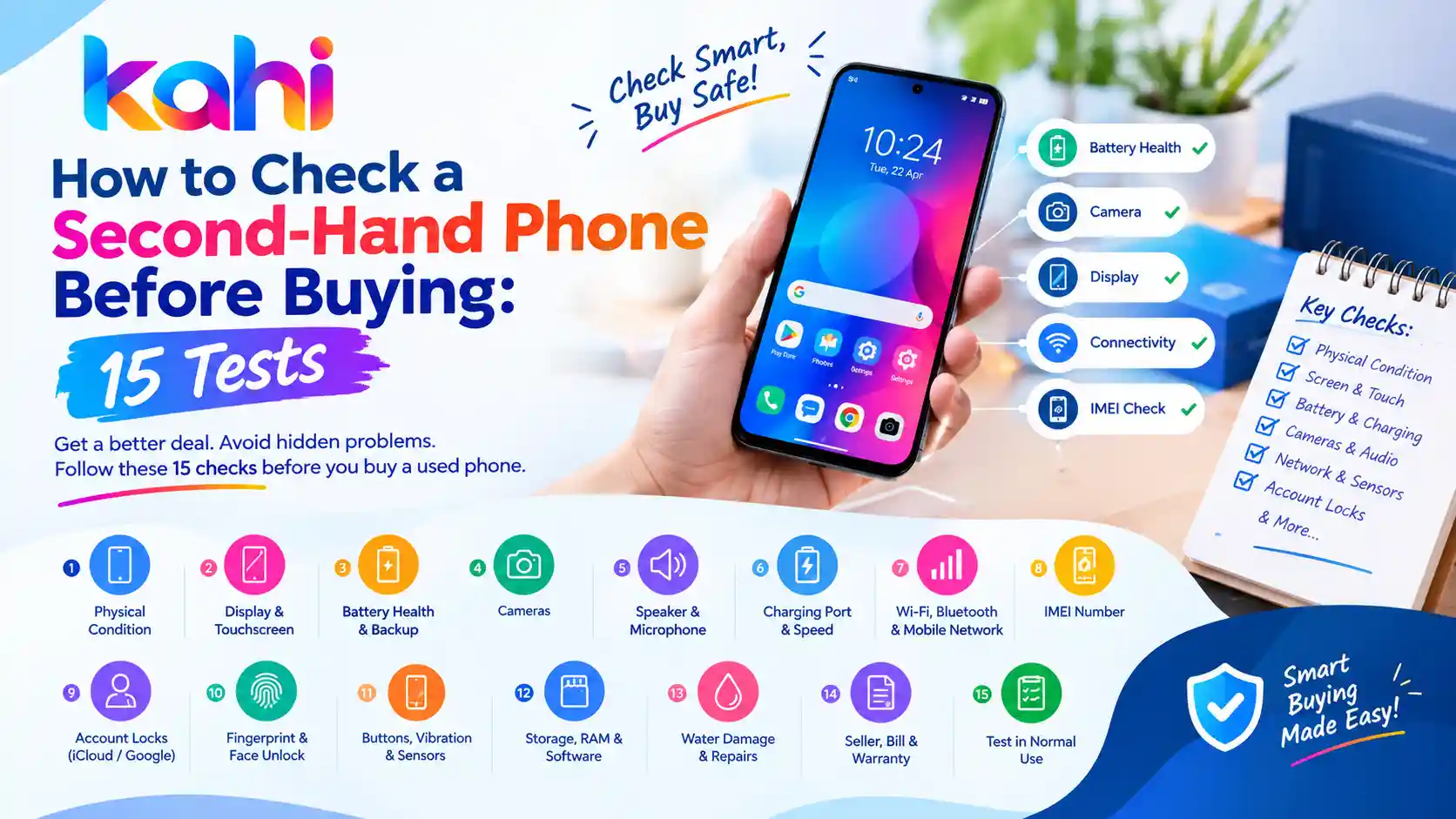
In this guide, we explain how to check a second-hand phone before buying with 15 simple tests. These checks can help you identify common problems, avoid suspicious deals, and make a more informed purchase through platforms such as Kahi.in.
1. Check the Phone’s Physical Condition
Start by carefully examining the phone’s body. Look for cracks, dents, scratches, loose buttons, and signs of impact.
Pay particular attention to the corners, screen edges, camera lenses, charging port, and back panel. These areas can reveal whether the phone has been dropped or poorly repaired.
Also check for gaps between the frame and screen, unusual bulges, or a back panel that appears to be lifting. A swollen battery can push the screen or back cover outward and requires professional attention.
What to do: Remove the case, inspect the device under good lighting, and ask the seller about any visible damage.
2. Test the Display and Touchscreen
The display is one of the most expensive components to replace, so test it carefully.
Open a white screen, a dark screen, and several colourful images. Look for dead pixels, unusual lines, flickering, discolouration, dark patches, and uneven brightness.
Next, open the keyboard or a drawing app and touch every area of the screen. Make sure the touchscreen responds accurately, including near the edges.
Check whether the brightness controls work and whether the screen changes brightness smoothly.
Warning sign: Random touches, unresponsive areas, or visible lines may indicate display damage or a previous low-quality repair.
3. Check Battery Health and Backup
A used phone may work normally but have a battery that drains quickly or shuts down unexpectedly.
Check the battery health information available in the phone’s settings. The exact feature depends on the model and operating system. Some phones provide a battery health percentage, while others offer only usage statistics or diagnostic tools.
Ask the seller how long the battery lasts during normal use. If possible, use the phone for several minutes with the screen on and observe whether the battery percentage drops unusually quickly.
Look for overheating, sudden shutdowns, or battery swelling.
Remember that a short inspection cannot accurately establish the phone’s total battery capacity or long-term backup.
4. Test the Cameras
Open the front and rear cameras and take several photographs in different lighting conditions.
Check the following:
- Front camera and selfie quality
- Rear camera focus
- Zoom functions, if available
- Flash operation
- Video recording and playback
- Unusual spots, haze, or blur in images
Switch between all available lenses, such as ultra-wide and telephoto cameras. Test autofocus by photographing an object close up and another farther away.
If the camera shakes excessively, fails to focus, or produces persistent spots, ask whether the camera module has been repaired.
5. Test the Speaker and Microphone
Audio problems can be easy to overlook during a quick inspection.
Play a video or music track at different volume levels. Listen for crackling, distortion, or unusually low sound.
Then record a voice note and play it back. If possible, make a test call to check the earpiece and microphone.
Also test the loudspeaker during a call and check whether the phone’s audio remains clear.
If the seller refuses a simple audio test, take extra care before proceeding.
6. Check the Charging Port and Charging Speed
Connect a compatible charger and confirm that the phone begins charging reliably.
Gently check whether the connector fits securely. If the phone supports fast charging, confirm that the relevant charging indicator appears when using a compatible charger and cable.
Look for:
- Loose or damaged charging connections
- Intermittent charging
- Excessive heat
- Moisture or corrosion around the port
- Charging that repeatedly starts and stops
Do not force a cable into the port or insert metal objects to clean it. If you suspect damage or moisture, have the device checked by a technician.
7. Test Wi-Fi, Bluetooth, and Mobile Network
A phone may look fine but have connectivity problems.
Insert your SIM card if possible and check whether the phone detects the network. Make a test call, send a message, and test mobile data.
Connect to a Wi-Fi network and pair the phone with Bluetooth headphones or another device if available.
If the model supports GPS navigation, open a maps application and check whether it can locate you.
For a dual-SIM phone, test both SIM slots where practical.
Important: Confirm that the phone supports the network bands and SIM type you intend to use.
8. Check the IMEI Number
The IMEI is a unique identifier used to identify a mobile device. Checking it can help you detect certain inconsistencies before purchasing.
On many phones, you can display the IMEI by entering *#06# in the dialler. You can also check the device settings or original packaging, although packaging alone is not proof of authenticity.
Compare the IMEI shown on the phone with the relevant documentation where available.
In India, use the official Sanchar Saathi portal or its CEIR-related services to check the IMEI status and relevant blocking information.
Do not buy a phone if its identifiers appear tampered with, the seller cannot explain a mismatch, or the device is reported blocked. An IMEI check does not guarantee that a phone is genuine or free of every legal or ownership issue.
9. Check for iCloud, Google Account, and Activation Locks
This is one of the most important tests when buying a used smartphone.
For an iPhone, ask the owner to sign out of their Apple Account and disable Find My as required before erasing the device. The phone should be ready for the new owner’s setup without asking for the previous owner’s credentials.
For an Android phone, the seller should remove their Google account and other relevant accounts before performing a factory reset. Otherwise, Factory Reset Protection may ask for the previous account during setup.
Ideally, complete the reset and initial setup with the seller present before paying.
Never buy a phone that remains locked to someone else’s account or requires the previous owner’s password. Do not rely on promises that the seller will unlock it later.
10. Test the Fingerprint Sensor and Face Unlock
Biometric features are convenient, but they can fail after damage or repairs.
Test the fingerprint sensor several times. If the phone supports face unlock, test that feature too.
Check whether the device recognises you consistently and whether biometric settings can be configured normally.
On phones with under-display fingerprint sensors, test different parts of the supported scanning area.
A failure could be caused by settings, a screen protector, or a hardware issue, so investigate before deciding. Do not accept a seller’s claim that a faulty sensor is always a minor software problem.
11. Check the Buttons, Vibration, and Sensors
Test every physical control, including:
- Power button
- Volume buttons
- Mute switch or action button, where available
- Vibration or haptic feedback
- Auto-rotate
- Proximity sensor during a call
- Side-mounted fingerprint sensor, if applicable
Buttons should respond consistently without sticking or requiring excessive pressure.
Make a test call and bring your hand near the top of the screen. The display should behave as expected when the proximity sensor is working.
Sensor availability and behaviour differ between phone models, so focus on features supported by the device.
12. Check Storage, RAM, and Software Information
Open the phone’s settings and confirm the model, storage capacity, operating system version, and available space.
Compare these details with the advertised specifications. For example, make sure a phone advertised as a 256 GB model is not actually a lower-storage variant.
Check whether the phone receives software updates and whether essential features work normally.
Be cautious if the device shows unusual system information, unexpected warning messages, or signs of unofficial software modifications that the seller cannot explain.
Also verify that the phone is not still enrolled in a company or school management system that could restrict your use.
13. Check for Water Damage and Previous Repairs
Water damage may cause problems long after the phone has dried.
Look for corrosion in accessible ports, fogging inside camera lenses, unusual display marks, or signs of rust. However, a visual inspection cannot reliably rule out liquid damage.
Ask the seller whether the phone has been opened, repaired, or had parts replaced. If the device has a liquid-contact indicator, its location and meaning vary by model.
Some phones include built-in repair or parts information, but not every model provides a complete repair history.
If you are considering an expensive phone, a technician’s inspection may be worthwhile, particularly when the device has visible damage or an unclear repair history.
14. Verify the Seller, Bill, and Warranty
Before making payment, ask the seller for available purchase documents and verify that the transaction details make sense.
Check:
- Original invoice, if available
- Seller’s identity and contact information
- Warranty status, if claimed
- Repair records, if available
- IMEI consistency
- Written confirmation of the sale and agreed price
An original invoice is useful, but its absence does not automatically prove that a phone is stolen. Consider the overall evidence and avoid transactions where ownership cannot be reasonably established.
If a seller claims the phone is under warranty, verify the coverage with the manufacturer or authorised service provider. Warranty coverage may depend on the country of purchase, device condition, and applicable terms.
15. Test the Phone Under Normal Use Before Paying
Finally, use the phone as you normally would for a few minutes.
Open several apps, browse the internet, record a short video, play audio, and switch between tasks. Observe whether the phone freezes, restarts, overheats unusually, or becomes unresponsive.
Check that the device can be reset and activated properly, and confirm that the seller has removed their personal accounts and data.
For a high-value phone, consider arranging an inspection at an authorised service centre or reputable repair shop before completing the purchase.
Bonus Tips to Avoid Second-Hand Phone Scams
Even a phone that passes most hardware tests can involve a risky transaction. Follow these precautions:
- Avoid prices that seem unrealistically low.
- Never share OTPs, passwords, or banking PINs with a seller.
- Avoid paying the full amount before inspecting the phone.
- Meet in a safe public place or use a trusted, documented transaction process.
- Get a written receipt with the device model, IMEI, price, date, and seller details where appropriate.
- Do not accept a phone that is still linked to another person’s account.
- If buying online, understand the platform’s payment, return, and dispute policies before paying.
A little caution can help you avoid losing money on a damaged, locked, or misrepresented device.
Second-Hand Phone Buying Checklist
Before finalising the purchase, confirm that you have checked:
- Physical condition and screen
- Touchscreen responsiveness
- Battery health and charging
- Front and rear cameras
- Speakers and microphones
- SIM, calls, mobile data, and Wi-Fi
- IMEI and relevant blocking status
- Apple Account or Google activation lock
- Fingerprint sensor and face unlock
- Buttons and supported sensors
- Storage and software information
- Signs of water damage or repairs
- Seller details, invoice, and warranty claims
- Normal operation under everyday use
- Final price and written proof of purchase
Frequently Asked Questions
How can I check whether a second-hand phone is good before buying?
Inspect the body and screen, test the battery, cameras, speakers, charging port, connectivity, and sensors. Verify the IMEI and make sure the phone is not locked to a previous owner’s account.
How do I check a used iPhone before buying?
Check battery health, camera operation, display quality, Face ID or Touch ID, charging, and network connectivity. Ask the owner to disable Find My and sign out of their Apple Account, then confirm that the iPhone can be activated by the new owner.
How do I check a used Android phone?
Test the touchscreen, battery, cameras, SIM network, Wi-Fi, Bluetooth, speakers, charging, and biometric sensors. Verify the device details and ensure that the previous Google account has been removed before completing setup.
Is checking the IMEI enough to know whether a phone is safe to buy?
No. An IMEI check can help identify certain blocking or identifier issues, but it cannot confirm every aspect of authenticity, ownership, repair history, or hardware condition. Combine it with physical checks and seller verification.
Should I buy a second-hand phone without a bill?
Be cautious and ask for other reasonable evidence of ownership. Verify the device identifiers, seller details, and any warranty claims. If the seller cannot explain the phone’s history or ownership, it may be safer to walk away.
Conclusion
Buying a second-hand phone can be a smart way to save money, but only when you check the device carefully. These 15 tests cover the main areas that can affect a used smartphone’s performance, safety, and value.
Take your time, test the phone in front of the seller, verify the IMEI and account-lock status, and agree on the price only after you are satisfied with its condition.
Looking for a used smartphone? Kahi.in helps you explore listings and compare available options. Use this checklist when evaluating a phone so you can make a more confident buying decision.
Disclaimer: This guide provides general buying advice. Device menus and diagnostic features vary by manufacturer and model. IMEI checks and visual inspections cannot guarantee that a device is free from every defect or ownership issue.